
日历介绍
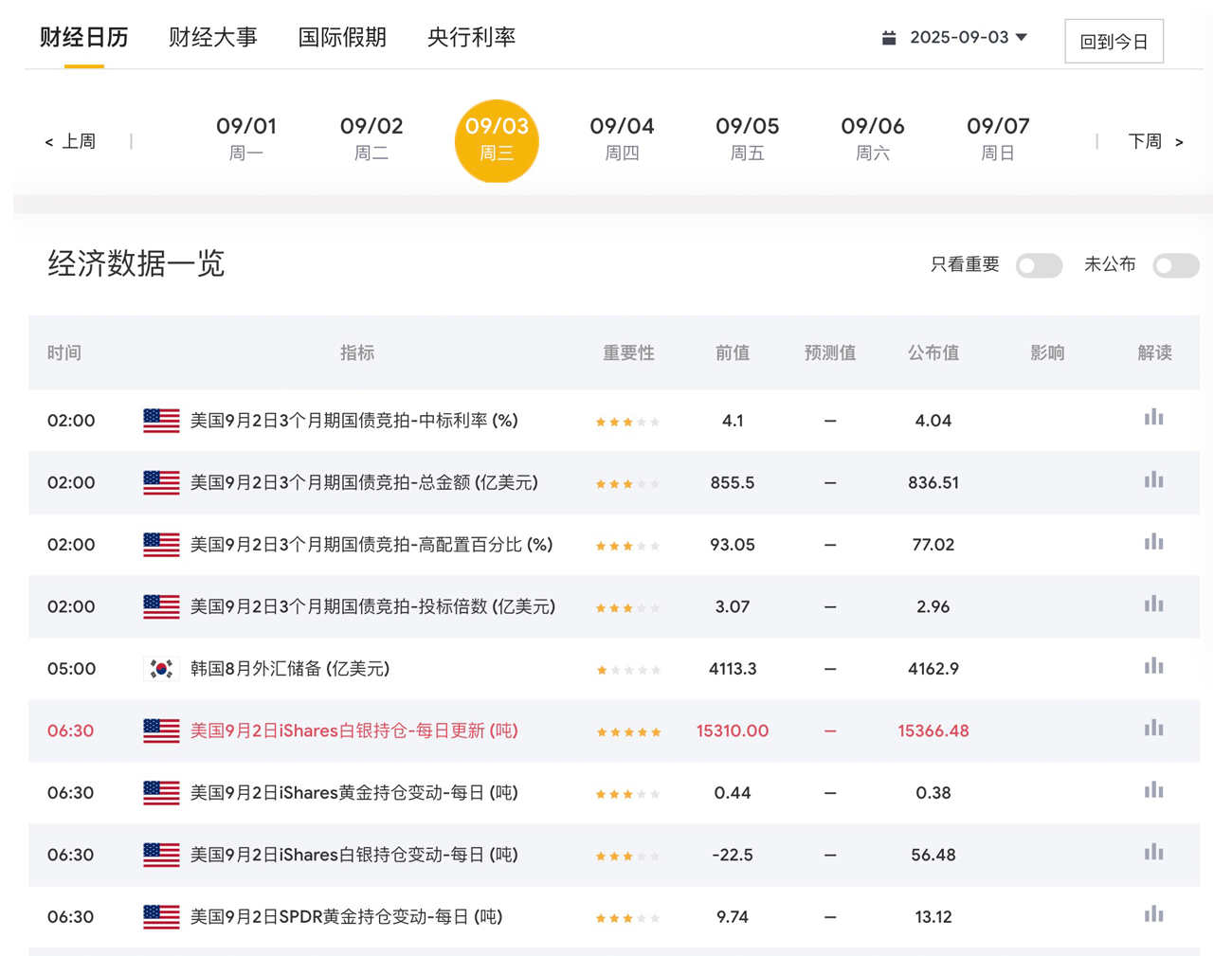
宏观数据日历精确统计了全球主要国家超过20年的经济数据。包括经济数据、事件和假期三大组成部分。可以通过日期、国家、重要程度等筛选功能快速定位所需数据。财经日历不仅整理了数据的重要性、前值、预测值、公布值等关键信息,还提供了数据解读功能,帮助用户深入了解数据对市场的影响力。此外,财经日历具有自动更新功能,数据发布后即时更新,确保用户获得最新、最精确的数据信息。
日历API
1. 接口列表
获取财经日历列表
接口地址:
https://jiekou.ldk24.com/api/calendar
请求方式:
GET
认证方式:
Bearer Token
(请在 Header 中携带 Authorization: Bearer {YOUR_TOKEN})
(请在 Header 中携带 Authorization: Bearer {YOUR_TOKEN})
请求参数 (Query Parameters)
| 参数 | 类型 | 必填 | 说明 |
|---|---|---|---|
| date | string | 否 | 日期,格式为:20260401 |
返回结果示例
{
    "status": "success",
    "code": 200,
    "message": "获取成功",
    "data": [
        {
            "id": 1148290,
            "indicator_id": null,
            "name": "M3货币供应年率",
            "country": "南非",
            "pub_time": "2026-03-30 14:00:00",
            "time_period": "2月",
            "actual": "8.39",
            "consensus": "",
            "previous": "7.44",
            "revised": "",
            "unit": "%",
            "star": 2,
            "affect": 0
        },
        {
            "id": 1150304,
            "indicator_id": 8011,
            "name": "6个月期国债竞拍-高配置百分比",
            "country": "美国",
            "pub_time": "2026-03-30 23:30:00",
            "time_period": "3月30日",
            "actual": "",
            "consensus": "",
            "previous": "1.37",
            "revised": "",
            "unit": "%",
            "star": 2,
            "affect": 0
        }
    ],
    "timestamp": 1774882580
}
2. 多语言调用示例
PHP (原生 CURL)
<?php
// 参数配置
$apiToken = 'x|xxxxxxxxxxxxxxxxxxxxxxxx';
$baseUrl  = "https://jiekou.ldk24.com/api/calendar";

// 构造请求参数:查询 20260330 的指标
$params = [
    'date'  => '20260330'
];
$apiUrl = $baseUrl . '?' . http_build_query($params);

$ch = curl_init();
curl_setopt_array($ch, [
    CURLOPT_URL            => $apiUrl,
    CURLOPT_RETURNTRANSFER => true,
    CURLOPT_HTTPHEADER     => [
        "Authorization: Bearer $apiToken",
        "Accept: application/json"
    ],
]);

$response = curl_exec($ch);
$data = json_decode($response, true);

if (isset($data['code']) && $data['code'] === 200) {
    echo "成功获取 {$data['count']} 条重要指标:\n";
    foreach ($data['data'] as $item) {
        printf("[%s] %s | 实际: %s | 影响: %d\n",
            $item['pub_time'],
            $item['title'],
            $item['actual'] ?: '待公布',
            $item['affect']
        );
    }
} else {
    echo "抓取失败: " . ($data['msg'] ?? '未知错误');
}

curl_close($ch);
Python (Requests 库)
import requests

api_token = 'x|xxxxxxxxxxxxxxxxxxxxxxxx'
api_url = "https://jiekou.ldk24.com/api/calendar"

# 设置过滤条件
payload = {
    'date': '20260330'
}

headers = {
    "Authorization": f"Bearer {api_token}",
    "Accept": "application/json"
}

try:
    response = requests.get(api_url, params=payload, headers=headers)
    res_json = response.json()

    if response.status_code == 200 and res_json['code'] == 200:
        print(f"日期: {res_json['date']} 共找到 {res_json['count']} 个关键指标")
        for item in res_json['data']:
            status = "✅ 已公布" if item['actual'] else "⏳ 待公布"
            print(f"{item['pub_time']} {item['title']} - {status} 数值: {item['actual']}")
    else:
        print(f"请求异常: {res_json.get('msg')}")

except Exception as e:
    print(f"连接失败: {e}")
JavaScript (Fetch API)
const apiToken = 'x|xxxxxxxxxxxxxxxxxxxxxxxx';
const baseUrl = 'https://jiekou.ldk24.com/api/calendar';

async function getCalendarList(date = '20260330') {
    // 构造带参数的 URL
    const params = new URLSearchParams({
        date: date
    });

    try {
        const response = await fetch(`${baseUrl}?${params}`, {
            method: 'GET',
            headers: {
                'Authorization': `Bearer ${apiToken}`,
                'Accept': 'application/json'
            }
        });

        const result = await response.json();

        if (result.code === 200) {
            console.table(result.data.map(item => ({
                时间: item.pub_time,
                指标: item.title,
                实际值: item.actual || '---',
                重要性: item.affect === 1 ? '高' : '平淡'
            })));
        } else {
            console.error('API 错误:', result.msg);
        }
    } catch (err) {
        console.error('请求失败:', err);
    }
}

getCalendarList();